Effects · VST3 / AU
Duopuler
The pitch shift, distance and left-right movement of a source passing by.
Make the sound of something passing by: a plane, a race car, a bullet, anything that flies past. Set how fast the source moves, how close it gets to the mic and when it passes. From a single motion path, Duopuler works out the changes in pitch, travel delay, pan, level and air absorption at once, and outputs one continuous stereo pass. Good for fly-bys, vehicles, projectiles, rotating machinery and fast Foley.
VST3 / AU · macOS 11 or later · Apple silicon and Intel · 14.2 MB
Controls
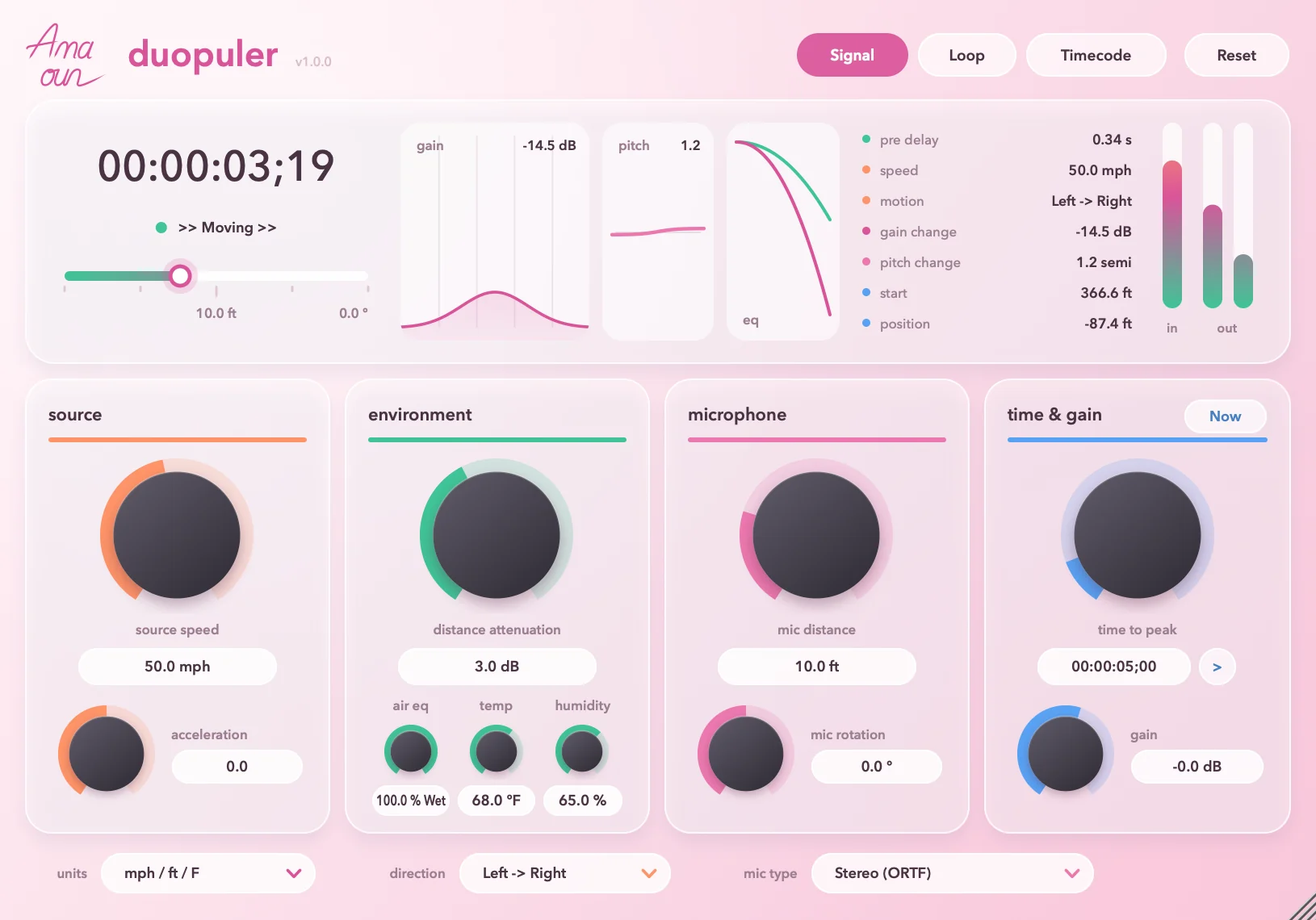
You don't draw curves. You just describe the motion: how fast the source goes, how close it gets to the mic, and when it reaches the closest point. The changes in pitch, level, pan and tone are all worked out from those few numbers.
-
How it startsSignal / Loop / Timecode
Pick one of the three at the top right. The default is Signal: one pass as soon as audio comes in. Loop repeats the pass. Timecode pins the closest moment to the timeline so you can line it up with picture. Reset starts the pass over.
-
Source motionsource speed / acceleration
How fast the source moves, 0 to 500 mph, default 50 mph. The faster it goes, the bigger the pitch change and the shorter and harder the pass. Use acceleration to make it speed up or slow down as it goes.
-
Environmentdistance attenuation / air eq / temp / humidity
How much the level drops each time the distance doubles, default 3 dB. With air eq, sound gets duller far away and stays clear up close. Temperature and humidity together decide how much high end the air takes away.
-
Microphonemic distance / mic rotation
How close the source gets to the mic as it passes, 3.3 to 400 ft, default about 10 ft. The closer it gets, the faster and harder the pass. Use mic rotation to turn the mic to face a different way.
-
Timing and leveltime to peak / Now / gain
When the source is closest to the mic, 0 to 40 seconds, default 5 seconds. Now fills in the current timeline position. The gain control sets the output level, up to +20 dB.
-
Bottom barunits / direction / mic type
Imperial or metric readouts; whether the source travels left to right or right to left; and the mic type, default Stereo (ORTF). Whichever you choose, the output is stereo.
Specs
v1.0.0
- Format
- VST3 and AU effect plugin, 64-bit
- System
- macOS 11 or later
- Processor
- Apple silicon and Intel (Universal)
- Sample rate
- Any. It follows your DAW. Render tests from 11.025 kHz to 192 kHz all passed.
- Channels
- Mono or stereo in, stereo out. A stereo input is first combined into a single source and then turned into a stereo pass, so the original left-right panning is not kept
- Latency
- Your DAW doesn't need to compensate for delay. The effect itself adds travel delay that depends on distance, and that is part of the sound
- Tail
- About 2 seconds of sound continues after the input stops
- Interface
- Drag the bottom-right corner to resize: minimum 760 × 530, maximum 1220 × 875, default 815 × 570
- Install location
- VST3:
/Library/Audio/Plug-Ins/VST3/Duopuler.vst3
AU:/Library/Audio/Plug-Ins/Components/Duopuler.component - Name in your DAW
- Manufacturer AmazeSound, plugin name Duopuler
- Not in this version
- AAX, standalone app and Windows version
- Installer
- A .zip archive with an installer (.pkg) and a Read Me.txt in Chinese and English
Can't find it in your DAW after installing? Rescan VST3 or AU plugins in your DAW. Logic Pro and GarageBand use AU.
Download Duopuler v1.0.0
Quit all DAWs first. Double-click the .zip to unzip it, then double-click the installer (.pkg) inside and follow the prompts. You can install VST3, AU or both, and you'll be asked for your Mac's login password along the way. When it's done, reopen your DAW or rescan plugins.