
Effects · VST3 / AU
KISSPETER ex
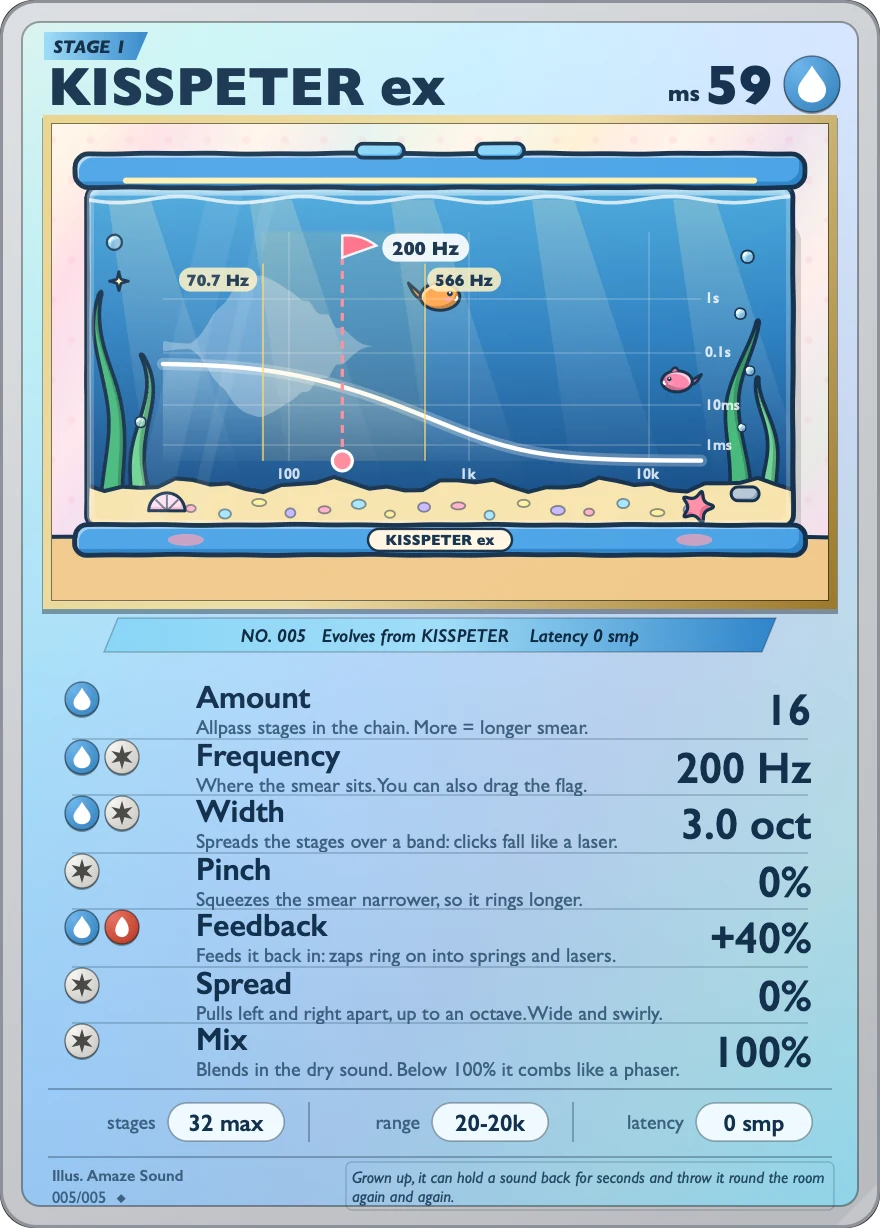
The advanced version of KISSPETER: up to 256 all-pass filter stages.
It builds on KISSPETER with feedback, left-right spread and a dry/wet mix. Width spreads the stages across a frequency range, so a click drops with a “pew”, like a laser. With all the new controls at their defaults, it sounds exactly like KISSPETER. The two are separate plugins, and you can install both.
VST3 / AU · macOS 11 or later · Apple silicon and Intel · 14.3 MB
Controls
The card shows seven parameters. The stages button at the bottom sets how many stages Amount can reach. There's no bypass button of its own; just use your DAW's bypass.
-
DepthAmount
How many all-pass stages are chained. From 0 up to the limit set by stages (256 at most), default 16.
-
Center frequencyFrequency
The frequency where the phase change is centered. 20 Hz to 20 kHz, default 200 Hz. You can also drag the flag on the display.
-
Fan outWidth
Spreads the stages across a frequency range, so a click falls like a laser. off to 10 oct (octaves), default off.
-
TightenPinch
Squeezes the delay into a narrower band, so the tail rings longer. 0 % to 100 %, default 0 %.
-
Feedback loopFeedback
Sends the output back for another pass, turning the sound into a sustained ring like a spring or a laser. −100 % to +100 %, default 0 %.
-
Left-right splitSpread
Pulls the left and right sides apart, up to one octave between them in total, so the sound gets wider and swirls. 0 % to 100 %, default 0 %.
-
Dry/wet mixMix
Blends the dry signal back in. 0 % to 100 %, default 100 %. Below 100 % you get a comb-like effect, like a phaser.
-
Stage limitstages
32 max / 64 max / 128 max / 256 max sets how many stages Amount can reach. The default is 32 max, the same as KISSPETER.
Specs
v1.0.0
- Format
- VST3 and AU effect plugin, 64-bit
- System
- macOS 11 or later
- Processor
- Apple silicon and Intel (Universal)
- Processing
- All-pass filters, up to 256 stages
- Sample rate
- Any
- Channels
- Mono or stereo
- Latency
- 0. With Feedback on, it may keep ringing for a moment after playback stops, up to about 2 seconds.
- Install location
- VST3:
/Library/Audio/Plug-Ins/VST3/KISSPETER ex.vst3
AU:/Library/Audio/Plug-Ins/Components/KISSPETER ex.component - Name in your DAW
- Manufacturer AmazeSound, plugin name KISSPETER ex
- Not in this version
- AAX, standalone app and Windows version
- Installer
- A .zip archive with an installer (.pkg) and a Read Me.txt in Chinese and English
Can't find it in your DAW after installing? Rescan VST3 or AU plugins in your DAW.
Download KISSPETER ex v1.0.0
Quit all DAWs first. Double-click the .zip to unzip it, then double-click the installer (.pkg) inside and follow the prompts. You can install VST3, AU or both, and you'll be asked for your Mac's login password along the way. When it's done, reopen your DAW or rescan plugins.