
Effects · VST3 / AU
MAGMA BASS
Low-end harmonic enhancer that makes bass audible on small speakers.
Small speakers like the ones in phones and laptops can't play very low notes. MAGMA BASS adds a layer of harmonics above the bass, so you can still hear the bass on those speakers. Frequency picks where the harmonics start and Intensity sets how much to add. Switch Orig. Bass to Out to remove the original lows and keep only the harmonics.
VST3 / AU · macOS 11 or later · Apple silicon and Intel · 14.3 MB
Controls
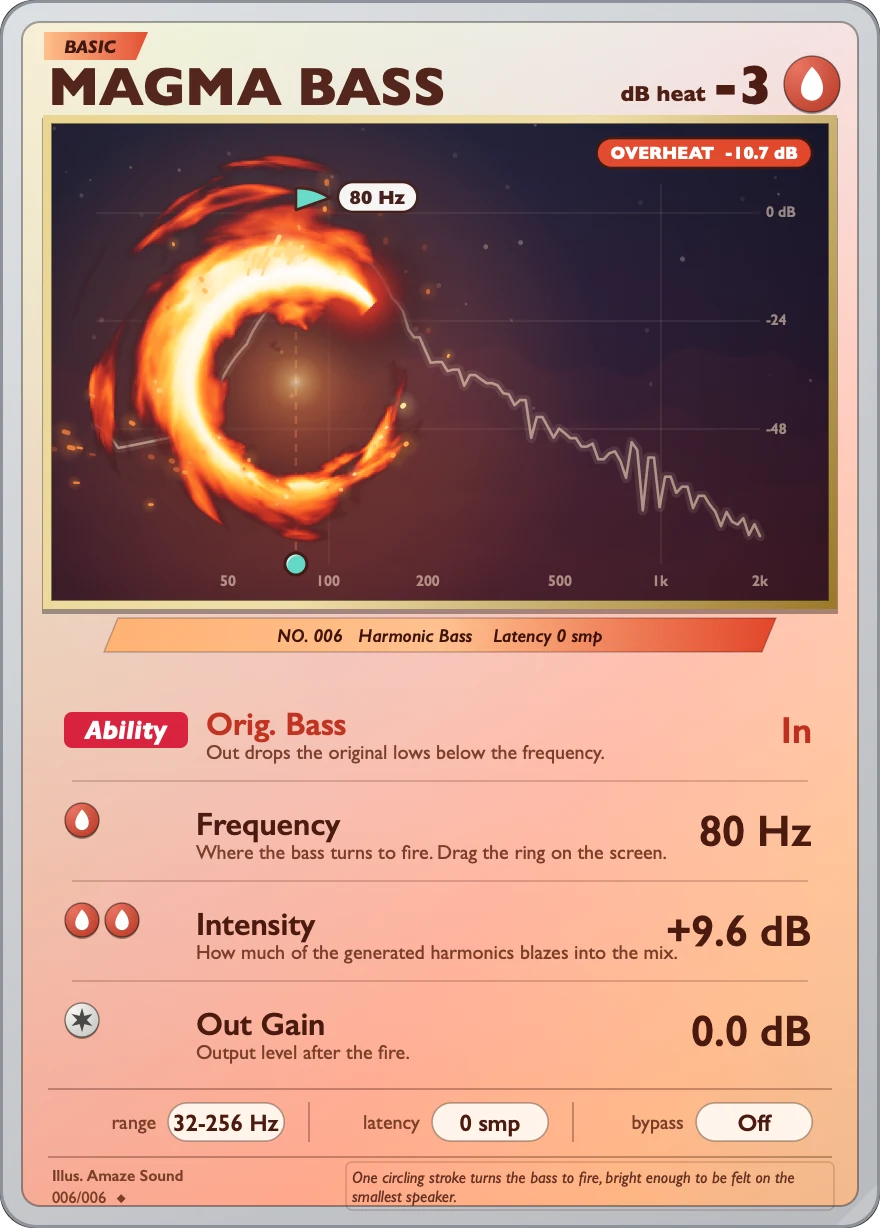
The card has an Orig. Bass switch and three knobs, with a heat readout in the top-right corner.
-
Original bassOrig. Bass
In / Out, default In. Out removes the original lows below Frequency and keeps only the added harmonics.
-
Start frequencyFrequency
The frequency where the added harmonics start. 32 to 256 Hz, default 80 Hz. You can also drag the ring on the display.
-
AmountIntensity
How much harmonic content is added. −24 to +24 dB, default 0 dB.
-
OutputOut Gain
The final output level. −30 to 0 dB, default 0 dB.
-
Bypassbypass
Off / On, default Off. Switching fades over 20 ms.
-
Heat readoutdB heat
The readout in the top-right corner of the card. It can't be adjusted. It shows how loud the recently added harmonics are.
Specs
v1.0.0
- Format
- VST3 and AU effect plugin, 64-bit
- System
- macOS 11 or later
- Processor
- Apple silicon and Intel (Universal)
- Sample rate
- Any. The sound was tuned at 48 kHz, and other sample rates are converted automatically.
- Channels
- Mono or stereo
- Latency
- 0
- When playback starts
- The effect fades in over about 33 ms
- Output protection
- A protective limiter at −3 dBFS. When it gets too loud, OVERHEAT lights up on the card
- Install location
- VST3:
/Library/Audio/Plug-Ins/VST3/MAGMA BASS.vst3
AU:/Library/Audio/Plug-Ins/Components/MAGMA BASS.component - Name in your DAW
- Manufacturer AmazeSound, plugin MAGMA BASS
- Not in this version
- AAX, standalone app and Windows version
- Installer
- .zip archive with an installer (.pkg) and a Read Me.txt in Chinese and English
Can't find it in your DAW after installing? Rescan VST3 or AU plugins in your DAW.
Download MAGMA BASS v1.0.0
Quit any open DAWs first. Double-click the .zip to unzip it, then double-click the installer (.pkg) inside and follow the prompts. You can install VST3, AU or both, and you'll be asked for your Mac's login password. When it's done, reopen your DAW or rescan plugins.