
Effects · VST3 / AU
Oceaniapan
Pan on an XY pad, then set the distance. Supports presets.
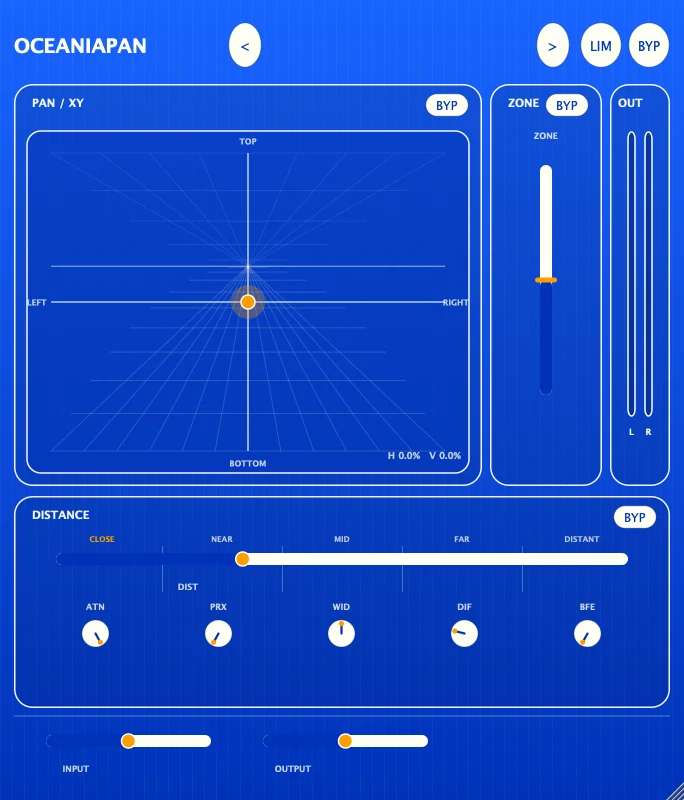
Pan / XY, Zone and Distance control a source's direction, zone and distance separately. Input, Output, Limiter and Bypass sit in a layer outside the processing, so levels stay matched when you compare before and after. Save a spatial setting you like as a preset, then load it any time and keep working on it.
VST3 / AU · Apple silicon and Intel · 137.8 MB
Controls
Comes with 146 factory presets. Factory and user presets are kept apart: user presets can be sorted into categories, created, loaded, replaced and deleted, while factory presets are read-only.
-
Pan padPan / XY
Sets where the source sits on the main pad.
-
Zone and distanceZone / Distance
Sets which zone the source is in and how far away it is.
-
PresetsFactory / User presets
Load a factory preset, or save your own spatial settings into a user category.
-
Input and outputInput / Output / Limiter / Bypass
Input and output level, a limiter and a bypass switch.
Specs
v0.6.1
- Format
- VST3 and AU effect plugin, 64-bit
- System
- macOS 11 or later
- Processor
- Apple silicon and Intel (Universal)
- Sample rate
- 44.1, 48 and 96 kHz use native data. 88.2, 176.4 and 192 kHz are converted from the 96 kHz data, with very small differences in the highs and in phase
- Latency
- Zero, so no delay compensation is needed
- Install location
- VST3:
/Library/Audio/Plug-Ins/VST3/Oceaniapan.vst3
AU:/Library/Audio/Plug-Ins/Components/Oceaniapan.component - Name in your DAW
- Manufacturer AmazeSound, plugin Oceaniapan
- Installer
- .zip archive with an installer (.pkg) and instructions
Upgrading from 0.6.0? The sound is exactly the same as 0.6.0. Only the installer got smaller, from 413 MB to about 138 MB. Sessions made with 0.6.0 and presets you saved are not affected. Just install over it.
Upgrading from 0.5.3? Sessions made with 0.5.3 open as they are, with all parameters in place. But the whole processing has been replaced, so it will sound different from 0.5.3. If you ever copied Oceaniapan.vst3 into ~/Library/Audio/Plug-Ins/VST3/ by hand, delete that copy before installing the new version, or your DAW may load the old one.
Can't find it in your DAW after installing? Rescan VST3 or AU plugins in your DAW.
Download Oceaniapan v0.6.1
Quit any open DAWs first. Double-click the .zip to unzip it, then double-click the installer (.pkg) inside and follow the prompts. You'll be asked for your Mac's login password along the way. You can install only VST3, only AU, or both (both is the default). When it's done, reopen your DAW or rescan plugins.