Effects · AU / VST3 / standalone app
SHOTpan
Set pan, distance and shot size together to place sounds in the picture.
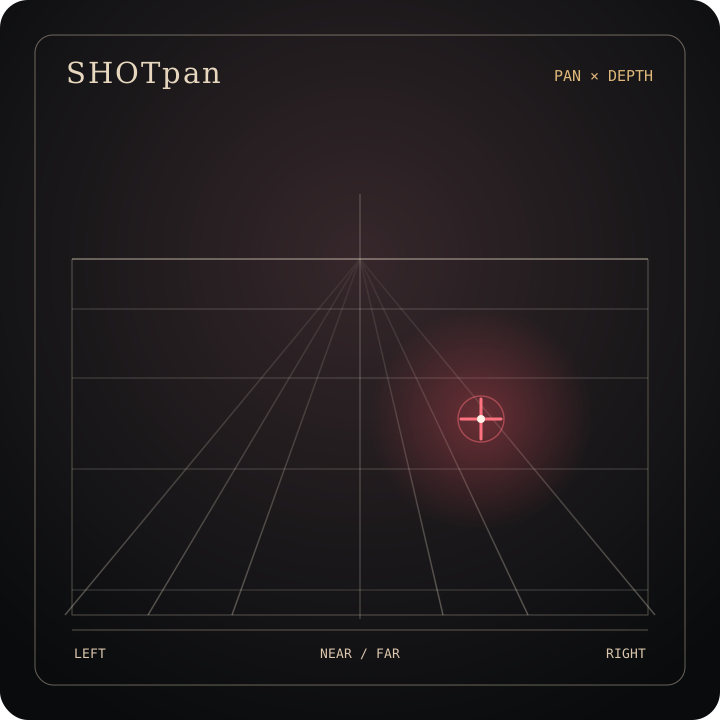
Pan and distance are set on the same grid. Four shot sizes, Wide, Medium, Tight and Close-Up, control how wide the space is. There's also manual delay, divergence and 14 measured factory environment responses for placing sounds and layering a scene. The sound changes smoothly as you drag the controls, so it's easy to find the right spot against the picture.
AU / VST3 / standalone app · macOS 11 or later · Apple silicon · 53.7 MB
Controls
Besides the spatial grid and shot size, echo, environment and output each have their own controls, so you can set them separately.
-
Pan and distancePan × Depth
Drag the source to set its left-right position and its distance.
-
Shot size and divergenceFocal / Divergence
Pick one of the four shot sizes. Switch divergence to MANUAL to set it by hand.
-
Delay and environmentDelay / Environment
Set Delay Time and Main Echo by hand, then pick one of the measured factory environment responses. Environment Wet and Send to Reverb are two switches: one toggles the wet state of the selected environment, the other decides whether the reflections go to a separate Reverb Send output.
Specs
v1.0.0
- Format
- AU, VST3, plus a standalone app
- System
- macOS 11 or later
- Processor
- Apple silicon (arm64)
- Environment responses
- 14 measured factory environment responses
- Installer
- Disk image (.dmg)
Download SHOTpan v1.0.0
Open it and follow the instructions inside. Before replacing an older version, quit all DAWs so you don't end up with two versions in the plugin folder.