
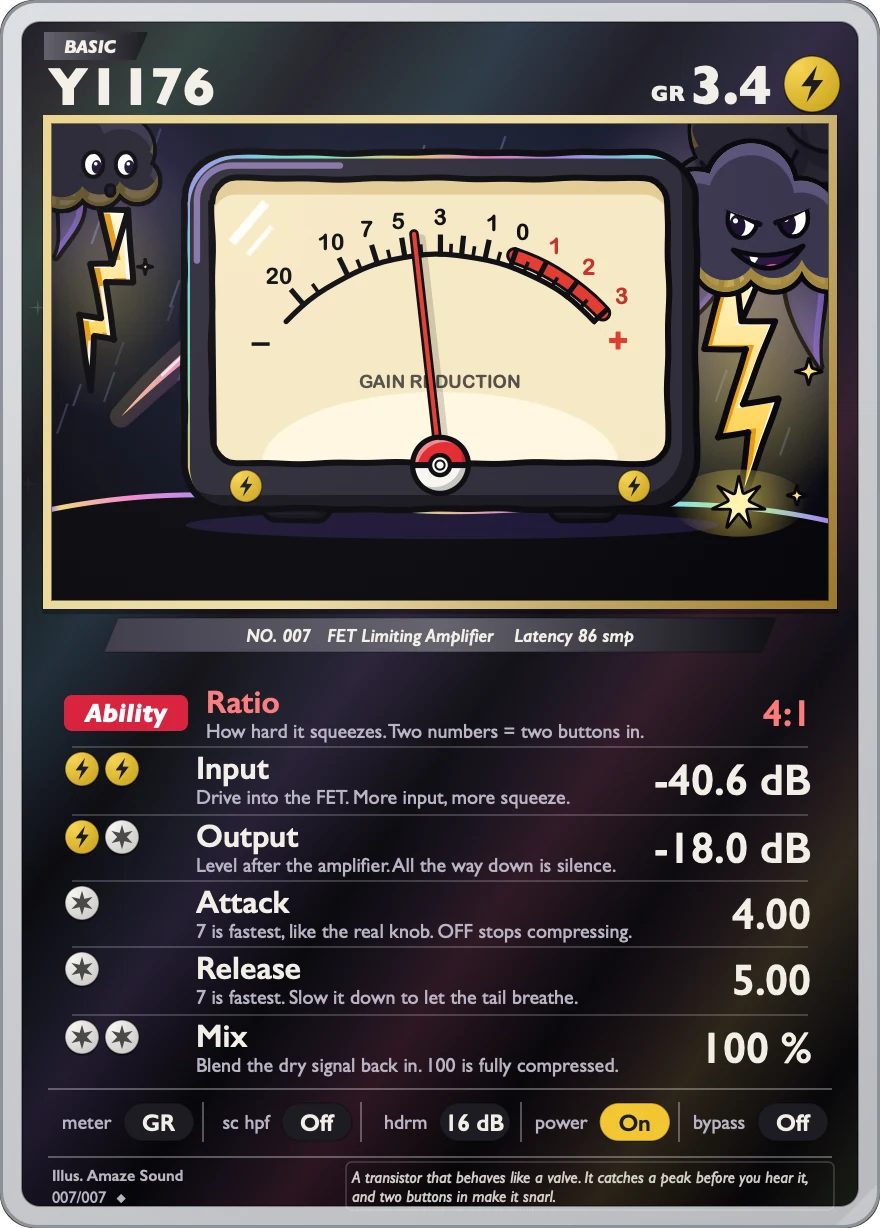
Effects · VST3 / AU
Y1176
FET compressor / limiter with a very fast attack that catches drum and vocal peaks.
Input sets how hard you drive it and how much it compresses, Output brings the level back, and Attack and Release set how fast it reacts. Besides the four Ratio settings from 4:1 to 20:1, you can press two buttons together (4+20, for example) for heavier compression with a bit of distortion. Turning Mix down gives you parallel compression.
VST3 / AU · macOS 11 or later · Apple silicon and Intel · 14.2 MB
Controls
The card has six parameters and a row of five buttons along the bottom. For Attack and Release, higher numbers are faster.
-
Compression ratioRatio
11 choices: None, 4:1, 8:1, 12:1 and 20:1, plus the two-button combinations 4+8, 8+12, 12+20, 4+12, 8+20 and 4+20. Default is 4:1.
-
Input levelInput
How hard you drive it. Higher means more compression. −Inf and −60 to 0 dB, default −40.57 dB.
-
Output levelOutput
The level coming out. Same scale as Input, default about −18 dB. All the way down there's no sound.
-
Attack timeAttack
How fast it clamps down. OFF and 1.09 to 7.00, default 4.00. 7 is the fastest. OFF means no compression.
-
Release timeRelease
How fast it lets go. 1.00 to 7.00, default 5.00. 7 is the fastest.
-
Dry/wet mixMix
0 to 100, default 100 (all compressed sound). Turn it down to blend the dry signal back in for parallel compression.
-
Metermeter
OFF / +4 / +8 / GR. Changes only what the meter shows, not the sound. GR shows how much gain is being reduced, +4 and +8 show output level. Default is GR.
-
Detector low cutsc hpf
Off / On, default Off. When on, it cuts the lows from the detector signal, so low end is less likely to trigger compression.
-
Headroomhdrm
4 to 28 dB in 4 dB steps, default 16 dB.
-
Powerpower
Off / On, default On.
-
Bypassbypass
Off / On, default Off. Your DAW's bypass button controls this too.
Specs
v0.1.0
- Format
- VST3 and AU effect plugin, 64-bit
- System
- macOS 11 or later
- Processor
- Apple silicon and Intel (Universal)
- Sample rate
- Any. Tested at 48 kHz and 96 kHz.
- Channels
- Mono or stereo
- Latency
- 86 samples at every sample rate, reported to your DAW
- Install location
- VST3:
/Library/Audio/Plug-Ins/VST3/Y1176.vst3
AU:/Library/Audio/Plug-Ins/Components/Y1176.component - Name in your DAW
- Manufacturer AmazeSound, plugin Y1176
- Not in this version
- AAX, standalone app and Windows version
- Installer
- .zip archive with an installer (.pkg) and a Read Me.txt in Chinese and English
Can't find it in your DAW after installing? Rescan VST3 or AU plugins in your DAW.
Download Y1176 v0.1.0
Quit any open DAWs first. Double-click the .zip to unzip it, then double-click the installer (.pkg) inside and follow the prompts. You can install VST3, AU or both, and you'll be asked for your Mac's login password. When it's done, reopen your DAW or rescan plugins.