
Effects · VST3 / AU
YLA-3A
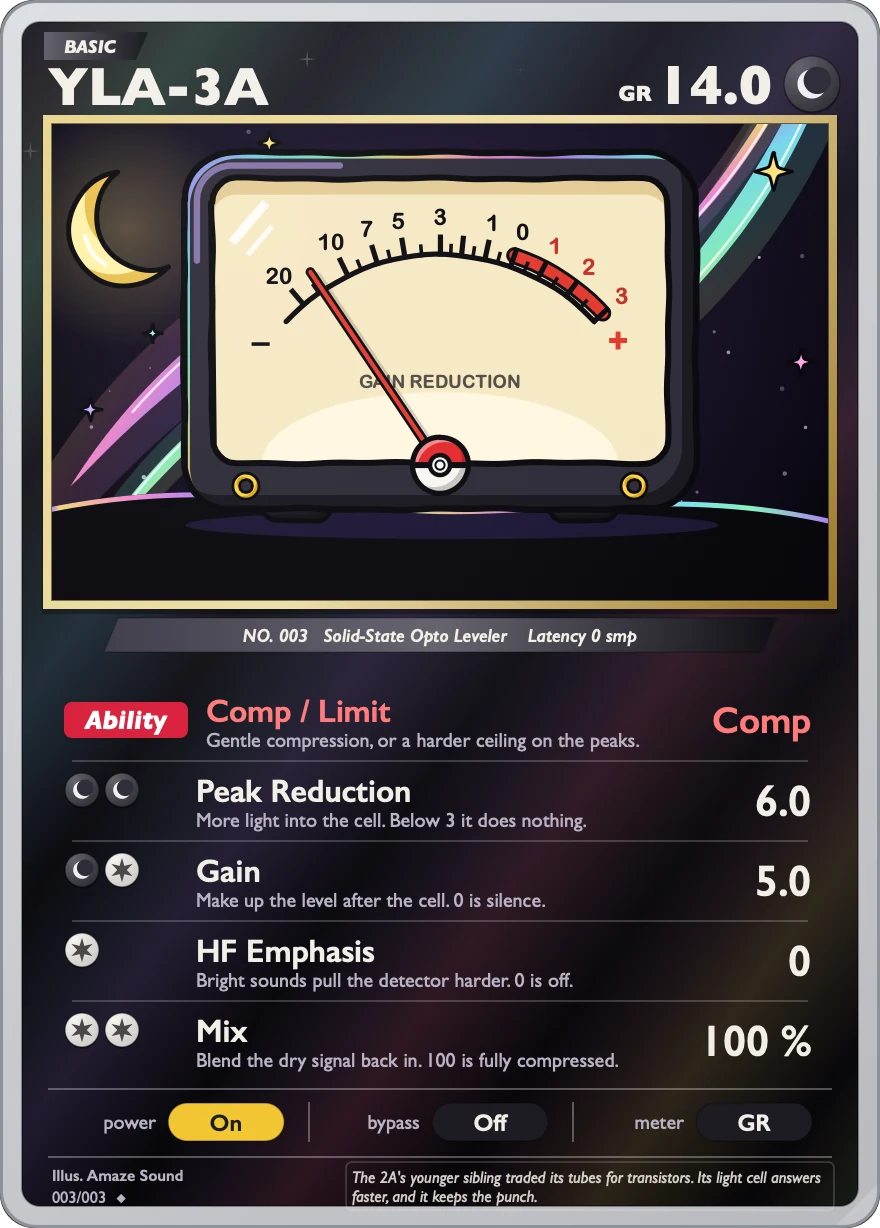
Solid-state optical compressor, faster and tighter than YLA-2A ex.
Good on vocals, bass and guitar. It's simple to use: pick Comp or Limit, set how much to compress with Peak Reduction, then bring the level back with Gain. HF Emphasis compresses bright sounds more, and turning Mix down gives you parallel compression. It works at any sample rate, with no latency.
VST3 / AU · macOS 11 or later · Apple silicon and Intel · 14.2 MB
Controls
The card has a Comp / Limit switch, four knobs and a row of three buttons along the bottom.
-
ModeComp / Limit
Two positions: Comp is gentle compression, Limit clamps down on peaks harder. Default is Comp.
-
AmountPeak Reduction
How much to compress. 0 to 10 in steps of 0.1, default 3.6. Below 3 there's hardly any compression.
-
MakeupGain
Brings back the level lost to compression. 0 to 10, default 5.0 (about +1.6 dB). All the way up is about +26 dB, and at 0 there's no sound.
-
High-frequency detectionHF Emphasis
Turn it up and bright sounds get compressed more. 0 to 100, default 0 (off).
-
Dry/wet mixMix
0 to 100, default 100 (all compressed sound). Turn it down to blend the dry signal back in for parallel compression.
-
Powerpower
Off / On, default On. When off, audio passes through unchanged.
-
Bypassbypass
Off / On, default Off. Your DAW's bypass button controls this too.
-
Metermeter
Off / GR / Out. Changes only what the meter shows, not the sound. GR shows how much gain is being reduced, Out shows output level. Default is GR.
Specs
v0.1.0
- Format
- VST3 and AU effect plugin, 64-bit
- System
- macOS 11 or later
- Processor
- Apple silicon and Intel (Universal)
- Sample rate
- Any. The sound was tuned at 48 kHz, and other sample rates are converted automatically.
- Channels
- Mono or stereo
- Latency
- 0
- Install location
- VST3:
/Library/Audio/Plug-Ins/VST3/YLA-3A.vst3
AU:/Library/Audio/Plug-Ins/Components/YLA-3A.component - Name in your DAW
- Manufacturer AmazeSound, plugin YLA-3A
- Not in this version
- AAX, standalone app and Windows version
- Installer
- .zip archive with an installer (.pkg) and a Read Me.txt in Chinese and English
Can't find it in your DAW after installing? Rescan VST3 or AU plugins in your DAW.
Download YLA-3A v0.1.0
Quit any open DAWs first. Double-click the .zip to unzip it, then double-click the installer (.pkg) inside and follow the prompts. You can install VST3, AU or both, and you'll be asked for your Mac's login password. When it's done, reopen your DAW or rescan plugins.