
Effects · VST3
O2Distance
Simulates how air absorbs high frequencies, so sounds seem farther away.
The farther sound travels, the more high end the air absorbs. O2Distance calculates that loss from distance, temperature and humidity, then adds the drop in level that comes with distance. Use it for dialogue distance, depth in Foley and layering ambience. It adds no reverb, so you'll need to build the sense of a room separately.
VST3 · macOS 11 or later · Apple silicon · 3.2 MBManual install and previous versions
Try it in your browser
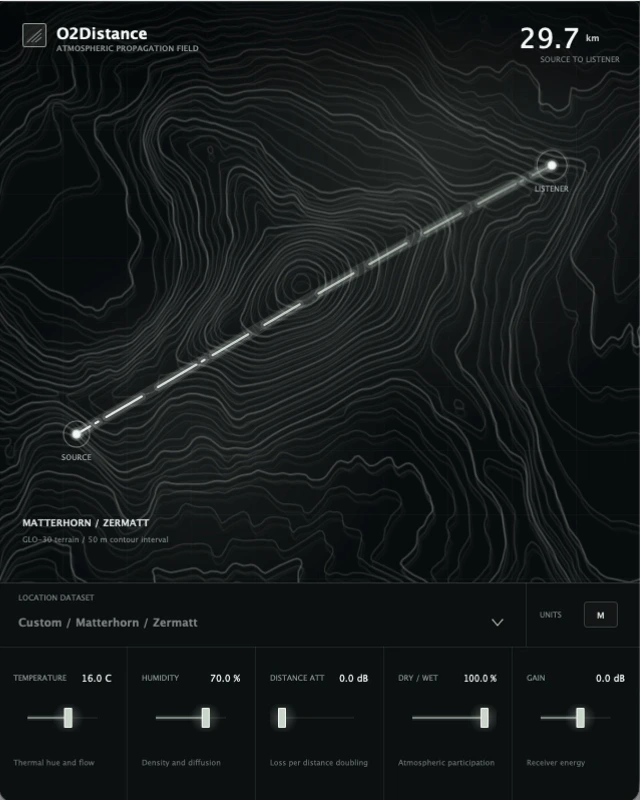
This is the O2Distance interface. Drag the listener marker on the map and turn the knobs to see how the values change. The web version only shows the interface; it doesn't process audio.
Interface preview, no audio processing Open in a new window
Controls
Distance and air conditions decide how much high end is lost. The other three controls then set the level and the dry/wet balance.
-
Listener distanceDistance
Drag the listener marker on the contour map to set the distance. The source marker stays fixed. The farther away, the more high end is absorbed.
-
Air conditionsTemperature / Humidity
Different air conditions absorb each frequency band by a different amount.
-
Distance attenuationDistance Att
How many dB the level drops each time the distance doubles. It's set separately from the high-frequency absorption, so it's easy to match the scale of the picture or volume automation you already have.
-
Mix and outputDry / Wet · Gain
Dry / Wet sets how much of the air absorption you hear. Distance Att and Gain aren't affected by it and always apply to the output. Use Gain last to bring the output level back to where you want it.
Specs
v1.0.1
- Format
- VST3 effect plugin, 64-bit
- System
- macOS 11 or later
- Processor
- Apple silicon (arm64)
- DAW
- Any 64-bit DAW that supports VST3 effect plugins
- Channels
- Mono in, mono out, or stereo in, stereo out
- Latency
- 0, so your DAW doesn't need to compensate for delay
- Install location
/Library/Audio/Plug-Ins/VST3/- Plugin file
O2Distance.vst3- Not in this version
- AU, AAX, standalone app, Intel version and Windows version
- Installer
- Installer (.pkg), plus a .zip for manual install
Upgrading from 1.0.0: in 1.0.0 the plugin file was named AirClone.vst3. When you install with the .pkg, the installer moves any old copy it recognizes into the AmazeSound/O2Distance/Legacy folder in Library / Application Support as a backup. Nothing is deleted. If you use the manual install, move the old plugin out of the plugin folder yourself first, so your DAW doesn't find two. The new version keeps the old VST3 plugin ID. Quit all DAWs before installing.
Download O2Distance v1.0.1
The installer puts the plugin in the system VST3 folder. For the manual install, drag O2Distance.vst3 into ~/Library/Audio/Plug-Ins/VST3/ or /Library/Audio/Plug-Ins/VST3/ yourself.